Literia Web Importer
Save papers to your Literia library straight from arXiv, IEEE, ACM, Springer and other publisher pages.
The Literia Web Importer is a browser extension that saves papers to your Literia library while you browse. When you are on a paper's page at an academic publisher — such as arXiv, IEEE, ACM, Springer, Elsevier or PubMed — it imports the paper's metadata (title, authors, abstract, identifiers) and its PDF into your library in one step.
Install it
- Select Add to Chrome on this page. It opens the extension's Chrome Web Store listing.
- Select Add to Chrome in the store and confirm.
- Sign in to Literia in the same browser. The extension uses your Literia session, so it only works while you are signed in.
Your browser may warn that the extension can "read your data on all websites". Publishers are spread across too many domains for a fixed list, so the extension has to be allowed to start on any page — but it checks the address first and stops immediately on anything that is not a recognised academic site. The Privacy Policy explains every permission it asks for.
Save a paper
- Open the paper's page on the publisher's site (the abstract page, not a search results page).
- Click the Literia icon in the browser toolbar. Under Current page, the popup shows the paper it found and offers its BibTeX citation.
- Select Add to Library. You can also right-click on the page and choose Add to Library.
- Open your library. The paper appears with its metadata, and its PDF once the download has finished.
 Importing a paper from arXiv
To read a paper in Literia straight away, select Read in App in the same popup. When Literia recognises the paper you are viewing, a Matched notice also appears in the corner of the page with an Open in App button.
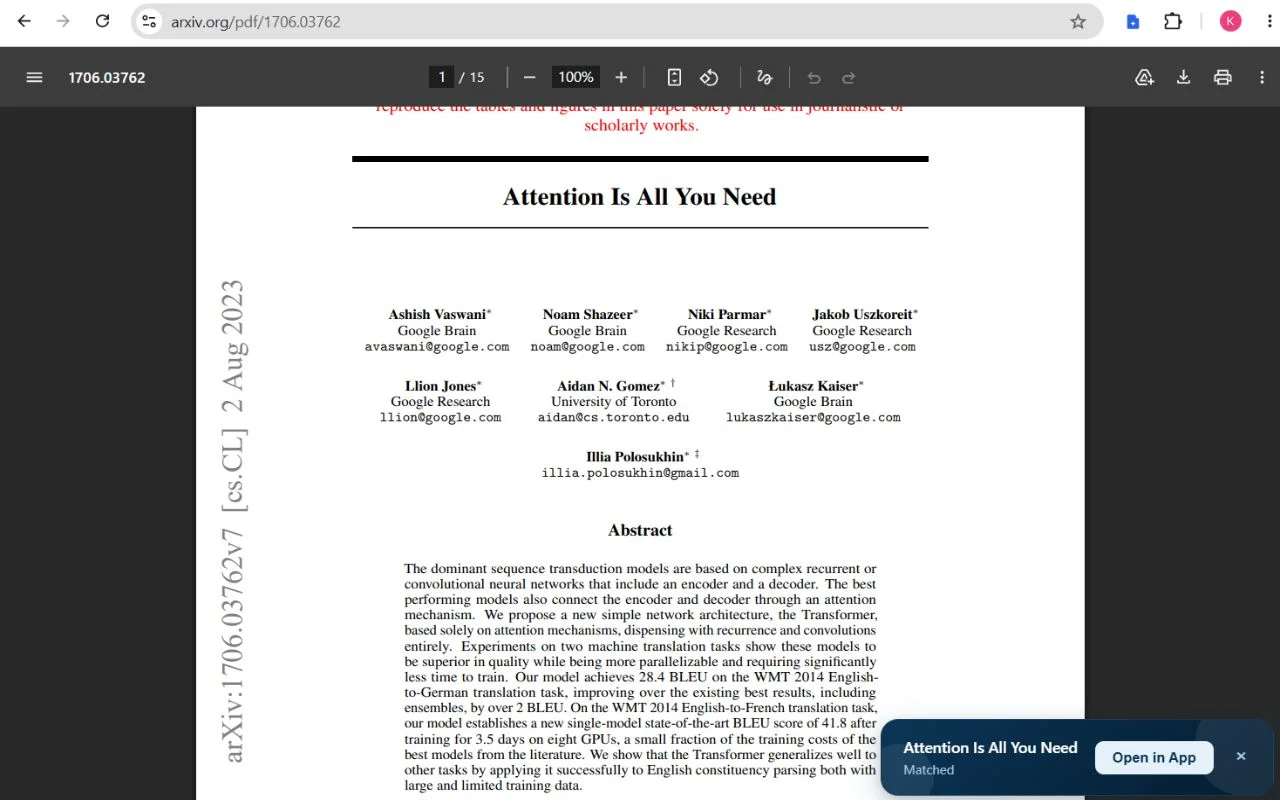 The Matched notice
Some publishers block automated downloads. The extension works around this where it can; if a paper arrives without its PDF, download the PDF yourself and upload it from the library — see Add papers to your library.
Privacy
The extension only reads pages on academic publisher sites, and only to identify the paper you are importing. It sends data only to Literia's own servers, never to third parties, and contains no advertising, analytics or tracking. Uninstalling it stops all collection immediately; signing out of Literia stops it from accessing your account. Full details are in the Privacy Policy.
Troubleshooting
- Nothing happens on a paper page. Check that you are signed in to Literia in the same browser, and that the page is a paper's own page on a publisher site.
- The paper was saved without its PDF. Download the PDF from the publisher and upload it from your library.
- Still stuck? Contact us with the page address you were on.